


Bridge: Debit Card Rewards
4.32.46K Reviews
App Specs
- Version
- 6.0.0
- Updated On
- License
- Free
- Downloads
- 100,000+
- Developer
- Bridge Money
- Categories
- Shopping
- Platform
- Android
Screenshots
 Analysis by AppCompare
Bridge can sound appealing if you already use a debit card for routine purchases and would like those transactions to lead to something extra. In practice, I’d approach it as a rewards app to explore alongside your usual spending, not as a reason to buy more. The key question is whether its available activities and rewards fit your habits well enough to justify the setup and ongoing attention.
Where people can get stuck
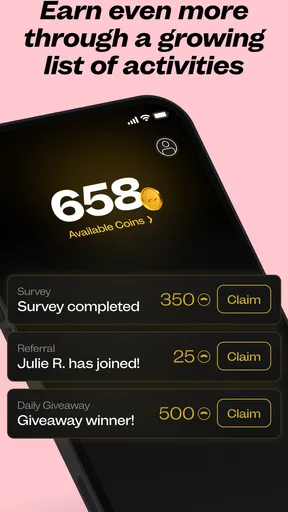
The first hurdle is understanding what the app expects before you can use it. Bridge is a shopping app from Bridge Money, and its appeal spans rewards as well as activities such as games and surveys. That mix can make the app feel less straightforward than a single-purpose cashback tool: you may need to look around to see which options suit you, rather than assuming every reward comes from simply swiping a card.
Linking a debit card is another point where it pays to slow down. Read the on-screen prompts carefully, check that you have selected the card you actually use for everyday purchases, and make sure the details are entered correctly. If you share household finances or keep separate cards for bills and discretionary spending, decide which card makes sense before you begin. That small choice can make it easier to judge whether the app is useful without mixing different kinds of spending in your own mental accounting.
Simple checks before you start
Bridge is free to download and is rated for Everyone. It has a 4.3 average from around 12,000 ratings, with roughly 2,400 written reviews and more than 100,000 installs. The current version is 5.2.3, and it runs on Android 7.0 or later. Those figures offer a quick sense of its audience, but they cannot tell you whether its rewards will match your own routine; that depends on what you find in the app and how you prefer to earn.
Before investing time, check that Bridge is available where you live and that the features shown in your account make sense for your situation. Availability can matter for shopping and financial apps, so it is better to confirm this during setup than to build a routine around an option you cannot use. Also remember that free to download does not necessarily mean every optional item is free: in-app purchases range from $2 to $52 per item. I would look at any purchase prompt closely and avoid paying for something unless its value is clear to me.
Using Bridge without changing your spending habits
A practical way to test the app is to keep your normal budget unchanged for a short trial. Use the debit card you planned to use anyway, browse the available rewards, and note whether the app gives you a reason to return. This helps separate genuine value from the excitement of seeing a points balance or a new offer. If you find yourself adding purchases just to earn, the rewards are no longer helping your budget.
How It Works
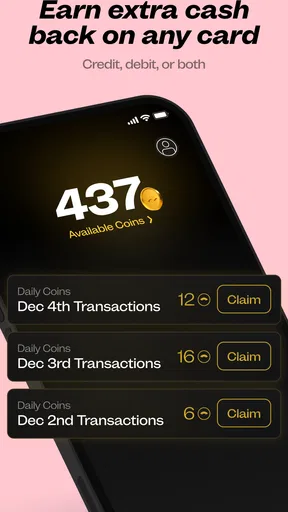
The idea behind Bridge is pretty simple but genius. Every time you make a purchase with your linked debit card, you earn points. These points can then be redeemed for a variety of rewards, ranging from gift cards to cashback. What’s cool is that it tracks your spending habits and offers personalized rewards that match your lifestyle. So, if you’re a coffee addict like me, you might find yourself with free lattes in no time.
Worth Reading Before You Choose

EA SPORTS FC Mobile 26 Is a Bigger Football Game, but It Takes Time

Flipboard Shows What News Apps Must Do Beyond the Feed

Switching to Android Auto Means Rethinking Your Driving Routine

Google Calendar Makes a Crowded Week Easier to Manage

Ludo King Makes the Most of the Minutes Between Plans

Baby Panda World Brings Quick Play to Modern Phones, but Its Game Library Feels Busy
The Rewards System
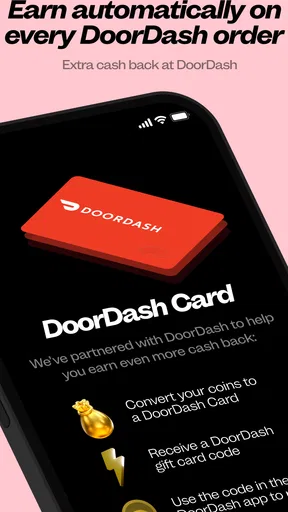
One of the standout features is the rewards system itself. It’s flexible and offers plenty of choices. Whether you’re into retail therapy, dining out, or just prefer cashback, there’s something for everyone. The app even throws in occasional bonuses and promotions, giving your points balance a nice little boost. It feels like a game, and who doesn’t love a good game, right?
Choosing a useful routine
For example, imagine you are already buying groceries, commuting, and picking up coffee during a normal week. A sensible test is to make those purchases as usual, then check Bridge at a time you already set aside for budgeting. Compare the rewards options with something you would genuinely use, rather than treating every offer as a reason to spend. If games or surveys are available to you, think of them as optional ways to spend spare time, not guaranteed earnings or a replacement for paid work.
This is where Bridge differs from the alternatives many shoppers use. A bank-linked cashback card may be simpler if you want rewards with little extra app activity; a coupon app may be better if your main goal is lowering the price of a planned purchase. Bridge makes more sense if you are comfortable exploring a mix of reward opportunities and checking the app occasionally. The trade-off is attention: the more options an app presents, the more useful it is to be selective about which ones deserve your time.
Keeping Track of Your Spending
Bridge comes with a host of features that help you keep tabs on your finances. The app provides detailed spending reports, breaking down your expenses by category. It’s a neat way to get insights into where your money is going and adjust your budget if necessary. This aspect of the app has been a game-changer for me, making me more aware of my spending habits.
What to do when something does not appear
If a purchase or reward does not show up as you expect, I would first check the transaction details and confirm that I used the debit card linked in Bridge. Give the app a fresh look after the transaction has had time to appear in your usual banking activity, and check that you are viewing the right part of the app. Avoid repeating a purchase, tapping through paid options, or changing your spending just to force a result. If the issue remains, use the app’s available support route and describe what you did and what you can see, without sharing more financial information than needed.
For surveys or games, a similar rule applies: check the instructions shown in the app and make sure you have completed the activity as requested. If the reward does not register, retracing the steps is more useful than assuming that every activity has the same completion process. Keeping expectations modest also helps; an activity-based reward can take time and attention, so it may not be worthwhile if you only want quick, passive cashback.
When the app may not be the cause
A setup problem is not always a Bridge problem. A card may be entered incorrectly, a transaction may still be pending with the bank, or a phone connection may interrupt a screen before it finishes loading. I would check the basic details first, then reopen the app and try again when the connection is stable. If a bank transaction itself looks wrong, contact the bank through its normal channel rather than treating a rewards app as a replacement for account support.
It is also worth separating a missing reward from a budgeting concern. Spending reports can help you notice patterns, but they do not make a purchase affordable or tell you what your priorities should be. I would continue using whatever budgeting method already works for me and treat Bridge’s view as an additional perspective, not the final record of my finances.
Security and Privacy
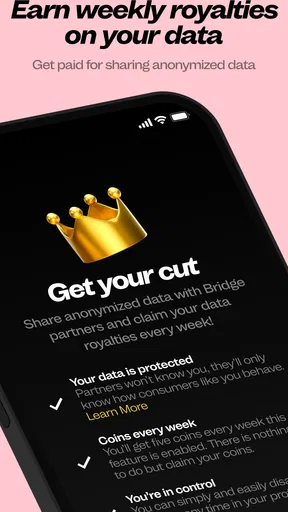
In today’s world, security is a huge concern, and rightly so. Bridge takes this seriously, implementing top-notch encryption to ensure your data is safe. Plus, they don’t sell your information to third parties, which is a huge relief. Knowing that my financial data is secure gives me peace of mind while using the app.
User Experience
The overall user experience with Bridge is top-notch. The app is responsive, and I haven’t encountered any bugs or glitches so far. It’s regularly updated with new features and improvements, which shows that the developers are committed to providing a quality experience. The customer support is pretty stellar, too—quick responses and helpful solutions.
Things to Consider
Now, while Bridge: Debit Card Rewards is pretty awesome, there are a couple of things to consider. The app is currently available only in a few countries, so make sure to check if it’s supported in your location. Also, while the rewards are enticing, it’s easy to get carried away with spending just to earn points. It’s a good idea to keep track of your budget and not overspend just for the sake of rewards.
Bridge is a better fit for someone who enjoys checking a rewards app and can stick to purchases they already intended to make. I would skip it if you want a completely hands-off rebate, dislike linking a card, or would rather keep shopping, surveys, and games in separate apps. Those preferences do not make the app poor; they simply mean that a simpler cashback option or your existing bank rewards may suit you better.
In conclusion, if you’re looking to make the most of your everyday spending, Bridge: Debit Card Rewards is definitely worth checking out. It’s a fun and rewarding way to turn your debit card transactions into tangible benefits, making every purchase feel like a step towards something exciting. So, if you’ve got a debit card and love rewards, give Bridge a try. You might just find yourself addicted to this clever little app.
Pros
- Earn rewards on everyday purchases.
- Easy integration with existing bank accounts.
- User-friendly interface and navigation.
- No hidden fees or charges involved.
- Real-time transaction notifications.
Cons
- Limited reward options for certain categories.
- Requires a stable internet connection.
- Not available in all countries.
- Occasional app glitches or slow updates.
- Customer support can be slow to respond.
FAQs for Bridge: Debit Card Rewards
What is Bridge: Debit Card Rewards?
Bridge: Debit Card Rewards is a financial app that allows users to earn rewards while using their debit card. The app links to your existing debit account and provides cashback and other incentives on purchases from participating retailers. It's designed to make your everyday spending more rewarding.
How do I earn rewards with Bridge?
Earning rewards with Bridge is straightforward. Once you link your debit card to the app, you automatically earn points or cashback on qualifying purchases. The app partners with various retailers, so you can earn rewards on groceries, dining, and more. Check the app for current offers and participating merchants.
Is Bridge: Debit Card Rewards secure?
Yes, Bridge prioritizes user security. The app uses encryption and other security measures to protect your financial information. Additionally, it only accesses transaction data to calculate rewards and does not have the authority to make transactions on your behalf. Always ensure you download the app from official stores to avoid security risks.
Are there any fees associated with using Bridge?
Bridge: Debit Card Rewards is free to download and use. There are no hidden fees or charges for earning rewards. However, it's essential to review any terms and conditions associated with your debit card, as some banks may have their own fees unrelated to the app itself.
What types of rewards can I earn with Bridge?
Bridge offers a variety of rewards, including cashback, discounts, and exclusive deals with partner retailers. The rewards depend on current promotions and partnerships, so they can vary. Users can check the app regularly to see which offers are available and plan their purchases accordingly to maximize rewards.


